MOD IT Support Expert Review

Backblaze Review: Is It a Good Cloud Backup for Home & Small Business?

Updated August 2026 · Reviewed by MOD IT Support

If your computer failed today, how much important data would you lose? Documents, family photos, business records, accounting files and years of other data can disappear because of a failed drive, ransomware, theft or simply deleting the wrong folder.

I have worked in the IT industry for more than 35 years and have tested and supported many backup solutions. For people who want a straightforward cloud backup for a Windows PC or Mac, Backblaze is one of the services I recommend.

Try Backblaze Cloud Backup →

Backblaze cloud backup logo
Overview

What Is Backblaze?

Backblaze Computer Backup is a cloud backup service for Windows PCs and Macs. Once installed, the application automatically identifies user data and begins securely backing it up to the cloud.

Unlike synchronization services such as OneDrive, Dropbox or Google Drive, Backblaze is primarily designed as a backup system. Synchronization helps make files available across devices; backup gives you another copy to recover after something goes wrong.

For important computers, I generally recommend both local and offsite protection rather than relying on a single copy of your data.

Why I recommend it

Backblaze Advantages

One of Backblaze's biggest strengths is simplicity. Many backup products provide large numbers of settings that users never configure correctly. Backblaze takes almost the opposite approach: install it, sign in, and let it work in the background.

1. Unlimited Computer Backup

Backblaze provides unlimited data backup for each licensed computer, so you do not have to choose a fixed storage tier. That is especially useful for computers with large photo, video, document or project libraries.

It also supports directly attached external drives. Network-mounted drives and NAS devices require a different backup approach.

2. Easy to Install and Use

Backblaze supports Windows and macOS and is designed to begin protecting files with very little configuration.

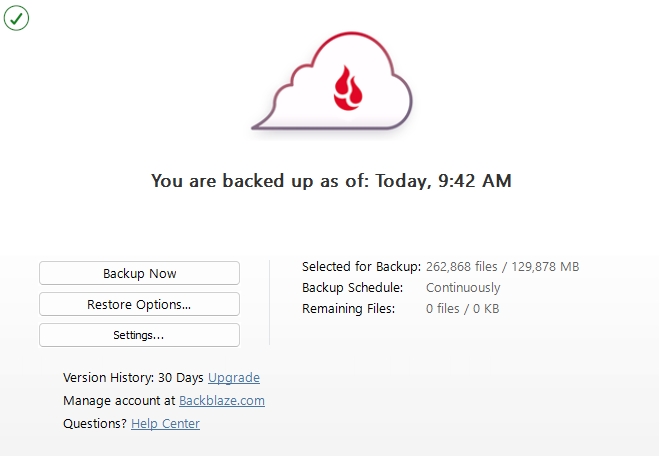
Backblaze desktop application showing a completed backup

3. Automatic Continuous Backup

Backups are most useful when people do not have to remember to run them. Backblaze can operate continuously in the background and upload new or changed files automatically.

4. Predictable Pricing

Backblaze Computer Backup is priced per computer rather than by the amount of data stored. Current published pricing is $7/month, $70/year or $130 for two years per computer.

View current Backblaze pricing →

Pricing can change. Check Backblaze for current plan details.

5. File Version History

Backup is useful for more than complete drive failure. Version history can help recover files that were accidentally deleted or changed. Backblaze offers standard version-history options and an extended Forever option for users who need longer retention.

6. Multiple Restore Options

Backblaze provides software-based restore options for downloading files back to a computer. For very large recoveries, physical USB-drive restore options can be useful when downloading terabytes of data would take too long.

Tradeoffs

Backblaze Disadvantages

One License Per Computer

A Computer Backup license covers one computer. You can manage multiple computers under the same account, but each computer requires its own license.

Large Initial Backups Take Time

Your first backup can contain hundreds of gigabytes or several terabytes. Uploading that amount of data can take considerable time, particularly when the Internet connection has limited upload speed.

Large Restores Take Time

Restoring a few documents is easy. Restoring several terabytes after a drive failure can take much longer, which is why the physical restore option can be valuable.

Not Designed for NAS Backup

Backblaze Computer Backup is intended primarily for data stored on a Mac or Windows computer and directly attached drives. Businesses backing up NAS devices or servers should evaluate a more appropriate backup architecture, including Backblaze B2 where applicable.

Backup vs. sync

Backblaze vs. OneDrive, Dropbox and Google Drive

A common question is, “If my files are already in OneDrive or Google Drive, do I still need backup?” Synchronization and backup solve different problems.

A synchronization service is primarily designed to keep files synchronized and accessible across devices. A backup system is designed around recovering data after something goes wrong.

For important information, I do not like depending on one copy or one service. A strong strategy can include your computer → local backup → offsite/cloud backup.

Who should consider Backblaze?

  • Home computers with important photos and documents
  • Home-office users
  • Professionals and consultants
  • Small businesses with important local files
  • Laptops that regularly leave the office
  • Users who want automatic backup without complicated administration
When you may need more

Who Might Need Something Different?

Backblaze Computer Backup may not be the best fit when you need centralized server backup, NAS backup, complex retention policies, image-based or bare-metal recovery, enterprise administration, or specialized compliance requirements.

Those environments usually need a broader business backup and disaster-recovery strategy.

Business backup help

Need Help Protecting Your Business Data?

MOD IT Support helps small businesses evaluate backup, cybersecurity and disaster-recovery strategies. If you are unsure whether your business computers, Microsoft 365 data, servers or other critical information are properly protected, we can help identify gaps.

Contact MOD IT Support Backup & Disaster Recovery

Affiliate Disclosure

Some links on this page are affiliate links. If you purchase Backblaze through one of these links, MOD IT Support may receive a commission at no additional cost to you. Our recommendations are based on our experience and evaluation of the product, not on the commission received.